In short: DocHelp migrates medical centres to Best Practice Premier, builds and supports the servers it runs on, configures it, trains staff with written manuals, and builds custom templates — Melbourne on site, Australia-wide remote.
We migrate practices to Bp Premier, build the servers it runs on, configure it for the way your clinic works, train your managers, reception and nurses on it with manuals they keep, and build the templates that cut paperwork in half. From people who use Bp inside their own practices every day.
Migration · Servers · Configuration · Training · Templates
Practices move to Bp Premier for the same reasons: the old software is unsupported, the practice is joining a group that runs Bp, or the team has outgrown what it has. The risk is the changeover weekend — data that doesn’t convert, templates that vanish, secure messaging that stops, a Monday morning nobody has trained for.
We have done this migration from Medical Director and Pracsoft and we run Bp in the practices we manage. The method is boring on purpose: scope, test, build, cut over, train.
There is no single right answer, and anyone who tells you there is usually sells one of them. Our IT team builds on-site servers and sets practices up on hosted arrangements. This is how we decide.
| Consideration | Integrated on-site server | Hosted / cloud |
|---|---|---|
| Control and speed | Clinical record on your own network; no dependence on internet speed for consults | Depends on connection quality and provider; a backup internet link is essential |
| Cost shape | Hardware, licences and setup up front; refreshed every few years | Monthly fee per practice or user; little up-front hardware |
| Backups and updates | Your responsibility (or ours under a support arrangement) | Provider’s responsibility — check the contract for what is actually included |
| Multiple sites | Possible with the right network design | Usually simpler for groups and remote staff |
| Who looks after it | Needs an IT team that knows medical software — that is us | Provider support plus someone local who understands the practice |
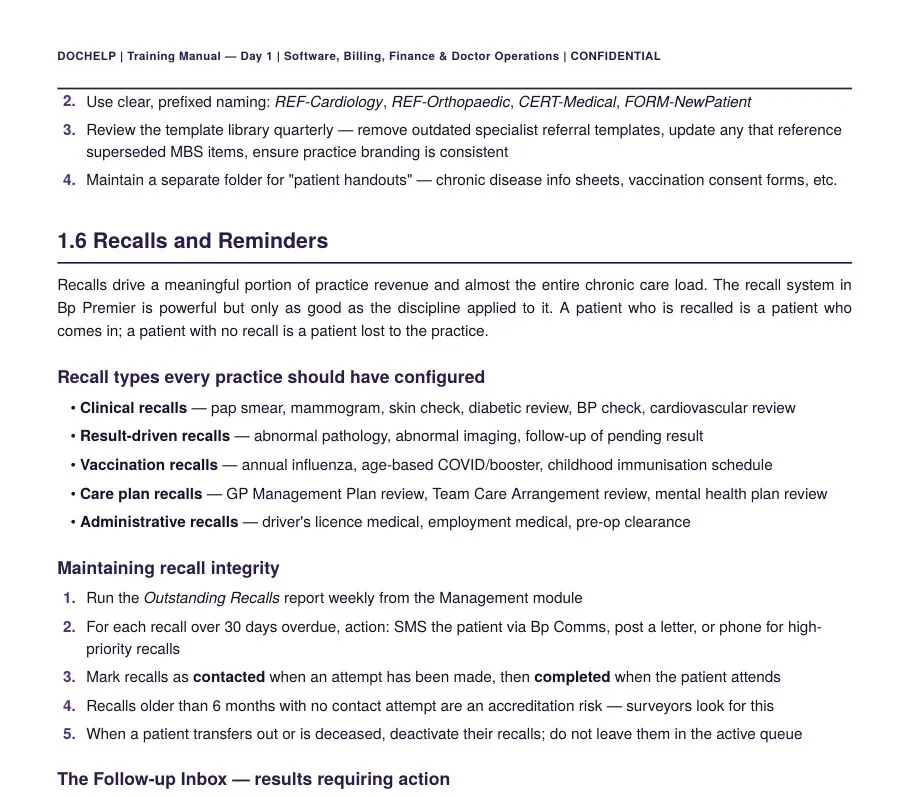
Most Bp problems are not software problems. They are habits nobody was taught. These are the ones we train into every reception team and practice manager.
Bulk patient verification and health identifier lookup for the day’s list; day sheet printed; uncompleted appointments from yesterday checked; reminder replies reviewed.
Every appointment billed on the day; appointment count reconciled to invoice count; item numbers chosen by the rules, not by habit.
PRODA and Medicare Web Services set up correctly; batches submitted and payment reports read daily; rejections worked by reason code, not left to age.
Banking reconciled in Bp, EFTPOS and Medicare receipts matched, the shortcut everyone knows, and a manager who checks it.
Clinical, result-driven, vaccination, care-plan and administrative recalls configured; outstanding recalls run weekly; the follow-up inbox owned by a nurse.
Clear, prefixed naming; a template library reviewed quarterly; superseded item numbers removed; patient handouts kept separately.
Our Practice Manager Foundation Program is two on-site intensive days on the practice’s own Bp Premier, each with a written manual, plus a Bp Premier reference manual for ongoing use by the manager and reception team. Every module has the same shape: overview, key concepts, step-by-step procedures, common pitfalls, and a checklist of what “good” looks like.
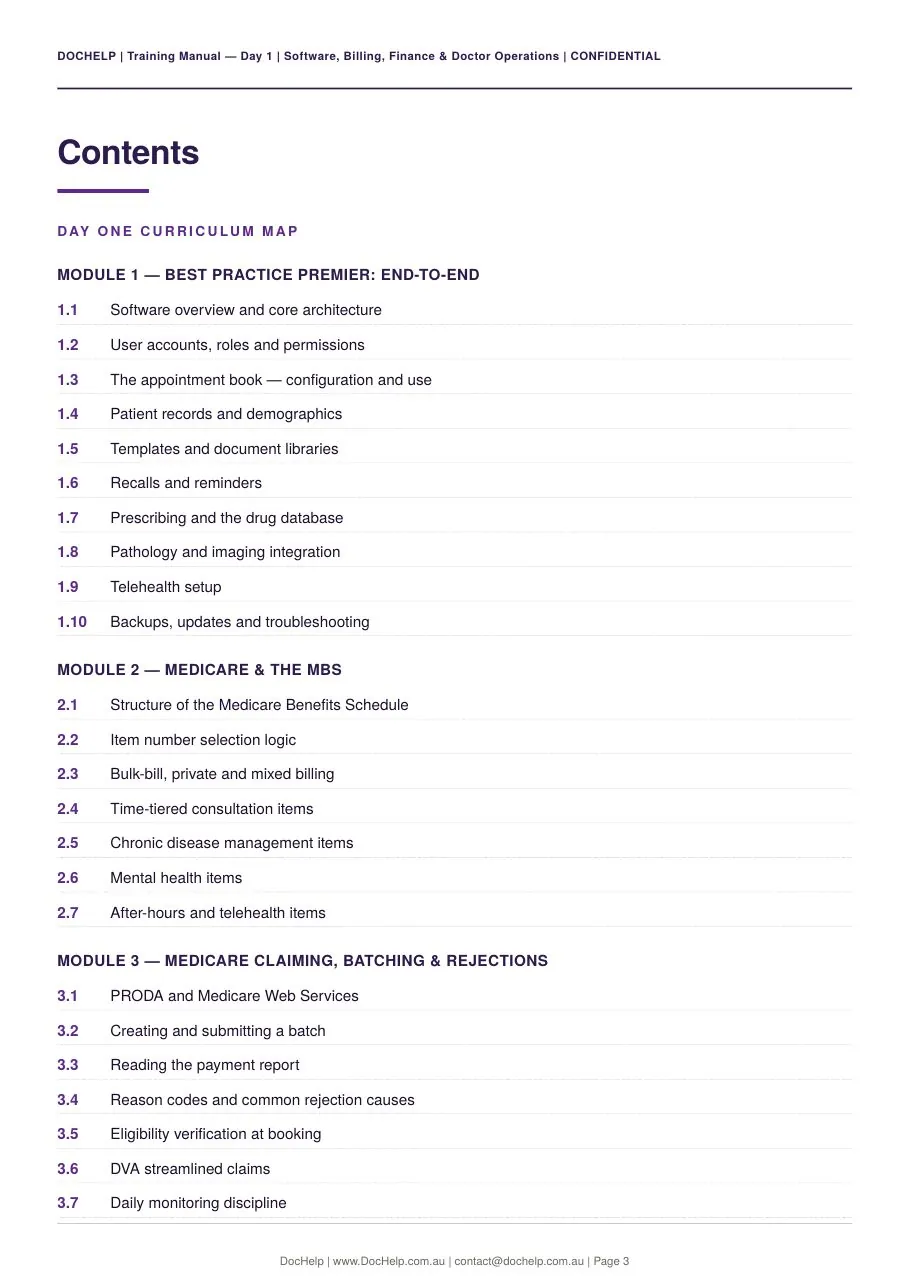

Bp Premier end to end · Medicare and the MBS · claiming, batching and rejections · TAC, WorkCover and DVA · doctor pays and billing splits · financial operations · operational reports.
Reception and nurse workflows, HR and rostering, quality and compliance ownership, patient experience and the manager’s monthly rhythm.
The software reference for how to do it inside Bp — configuration, appointment book, records, billing, claiming, payments, banking, documents — with real screenshots and a self-assessment checklist.
Manuals are written for each client practice. Sample pages shown; client details removed.
Built into your Bp Premier with the right merge fields, so a chronic condition management plan, a consent disclosure or a specialist referral is a few clicks rather than twenty minutes of typing. Our clients tell us the automated templates cut their paperwork time by around half.
Condition-specific plan templates — hypertension, back pain, osteoporosis, ischaemic heart disease, migraine, arthritis, iron deficiency, hyperlipidaemia, GORD — pre-filled from the record and aligned to the current MBS chronic condition items.
Mixed-billing disclosure, assignment of benefit, telehealth and AI-scribe consent, new-patient registration — the documents that keep billing and privacy clean.
Referral, specialist and allied health letters, certificates and correspondence with clear prefixed naming so staff find them first time.
Start-of-day and end-of-day checklists, onboarding and offboarding checklists, banking and batching routines — the paper that makes the training stick.
Scope the data, run a test conversion the doctors can check, build Bp Premier for your practice — users, templates, fee schedules, recalls, secure messaging, integrations — then convert for real over a weekend with the clinic closed, and be on site Monday morning with the team. We have migrated practices this way and run Bp inside the centres we manage.
Both work. An integrated on-site server gives you full control, no dependence on internet speed for the clinical record, and one-off hardware cost; hosted or cloud arrangements move the server, backups and updates to a provider for a monthly fee and suit multi-site groups and practices without IT support. We build and support on-site servers, and we set practices up with hosted arrangements where that fits — the decision is about your sites, your internet, your budget and who looks after it.
Yes, on site and remote, with written manuals the team keeps. Our Practice Manager Foundation Program is delivered in two on-site intensive days with a manual for each day and a Bp Premier reference manual for ongoing use. Reception and nurse training is delivered in shifts on the practice’s own system.
Chronic condition management plan templates by condition, consent and disclosure documents, referral and letter templates with the right merge fields, reception checklists and onboarding documents. See the templates library. Clients tell us the automated templates cut their paperwork time by around half.
Yes — it is most of what we do. Fee schedules that don’t match, recalls nobody runs, secure messaging half-connected, doctors without templates, no daily discipline on uncompleted appointments and batches. We audit the configuration, fix it, and train the team to keep it that way.